
What to Do When Google Workspace is Suspended

Summary of this ArticleKnow what's in this article
What will happen to your agency's revenue when Google Workspace is suspended without warning, cutting off every client email, calendar, and document in seconds? A sudden halt on your Google Workspace can be a business emergency for you especially if you rely on SEO for service based businesses. Your team cannot access Gmail and shared drives go offline, the scheduled meetings you have with your clients get cancelled, and your business stops.
Smartly summarized from full article, need to know more Talk to a growth expert at GenzPro
What will happen to your agency’s revenue when Google Workspace is suspended without warning, cutting off every client email, calendar, and document in seconds?
A sudden halt on your Google Workspace can be a business emergency for you especially if you rely on SEO for service based businesses. Your team cannot access Gmail and shared drives go offline, the scheduled meetings you have with your clients get cancelled, and your business stops.
Providing digital infrastructure for companies in Dubai, from fast-expanding startups in Dubai Internet City to long-standing companies in DIFC and those with a global footprint requires uptime.
I studied the latest enterprise metrics and found that downtime costs of the top 2,000 global companies total around $400 billion annually; and if a platform like Google Workspace is suspended, everything from client emails to cloud storage halts and the fallout from that downtime extends well past the bottom line, which has a permanent impact on a company’s shareholder value, brand reputation, innovation pace, customer loyalty and your credibility.
If your Google Workspace is suspended right now, it will not resolve on its own; it needs a systematic troubleshooting process. Continue reading to learn what to do when Google Workspace is suspended, with a precise diagnosis and a troubleshooting playbook to bring accounts back online quickly.
Why Google Workspace Is Suspended: The 4 Main Culprits
Account suspensions rarely happen without cause. I reviewed Google’s suspension triggers and grouped them into four primary categories:
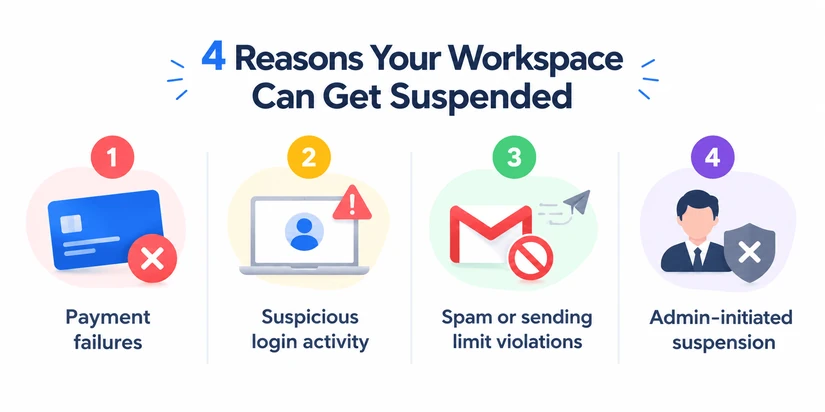
1. Payment Failures (Google Workspace Billing Suspension)
This is the most common reason for a complete domain-wide shutdown. Google operates on an automated billing cycle. If your primary card fails due to an expired card, an exceeded credit limit, or bank-side security blocks, Google will provide a short grace period of typically 30 days, depending on your contract. Once that expires, Google suspends the entire subscription.
2. Security Risks and Compromised Credentials
Google’s automated abnormality detection algorithms flag accounts when they detect irregular behaviour. For example, if an employee accesses accounts from a Business Bay office in Dubai and, two minutes later, Google records a live session from an IP address in Eastern Europe, the automated security hold is issued to safeguard against data exfiltration.
3. Terms of Service (ToS) Violations & Send Limits
In Feb 2024, Google and Yahoo jointly introduced harsh anti-spam enforcements for bulk email senders. The rules state that keeping your reported spam rate below 0.10% is mandatory, and hitting a threshold of 0.30% or higher leads to severe restrictions with immediate account suspension.
If someone on your team uses their direct Google Workspace inbox to blast unsegmented cold email lists, they will trip these automated filters. Workspace accounts carry hard outbound limits, typically 2,000 messages per 24-hour period for standard users, or 500 for trial accounts. Exceeding these limits triggers an automated suspension.
4. Manual Admin Action
Occasionally, the suspension is internal. If your Google workspace is suspended a workspace administrator may have manually toggled an account off during an employee offboarding, security audit, or department restructuring.
How to Restore an Individual User Account (Step-by-Step)
If only one user’s Google Workspace is suspended, your domain-level settings won’t be changed. You can restore suspended Google Workspace account by using the admin console.
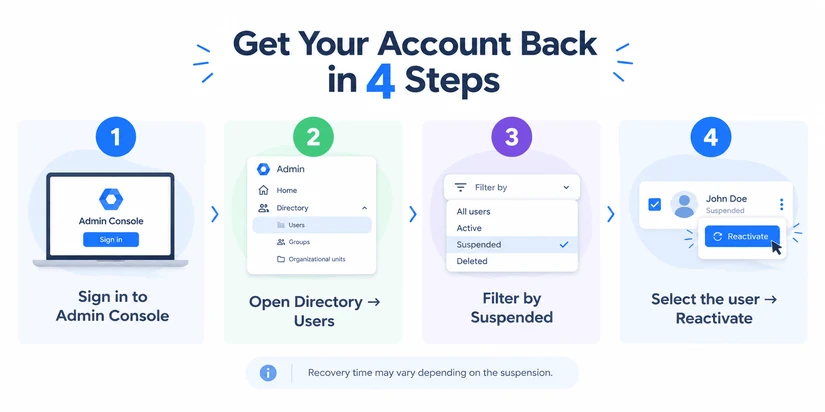
Step 1: Go to admin.google.com. Sign in using your administrator account that has Super Admin access or can access User Management.
Step 2: Click on Directory on the left-hand navigation menu, then Users.
Step 3: Searching for the user manually is not a good idea when you are running a large organisation. For example, under Add a filter, select User status. Select the box for Suspended. Click Apply.
Step 4: Reactivate user Google Workspace access: click the suspended user’s name to open their profile details. Read the alert notification banner that explains the reason your account was suspended.
In the upper-left card under the user’s name, click Reactivate or navigate to More Options > Reactivate. A modal confirmation will appear. Agree to the conditions and then click Reactivate again to confirm.
In most cases, the user will be unlocked after 15 minutes, but it might take up to 24 hours for directory changes to get replicated everywhere, Google says.
How to Restore an Entire Suspended Subscription (Billing Issues)
A domain-wide Google Workspace billing suspension applies to all of your users at the same time and disconnects all their emails and Google Drive documents.
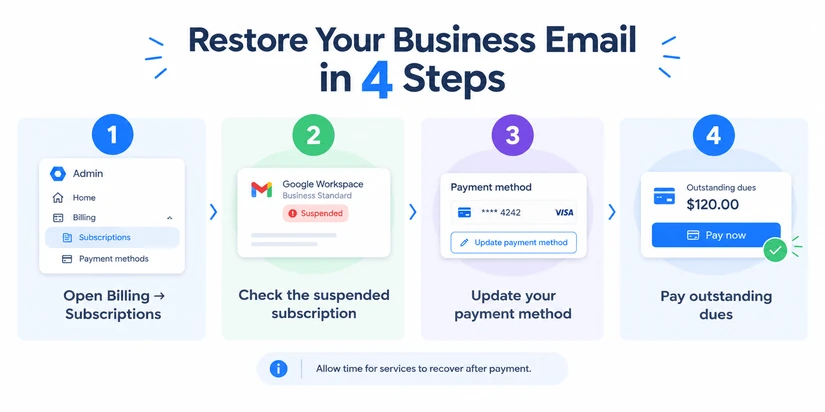
If the whole company’s Google Workspace is suspended and the admin console shows a suspended alert for the domain, here is how to get back in:
- Step 1: Sign in to the Google Admin console as a Super Admin. Go to Billing > Subscriptions.
- Step 2: In your list of subscriptions, your Google Workspace offering (e.g., Business Starter, Business Standard, Enterprise, etc.) will be marked with a red Suspended status. Click on the subscription to view the outstanding balance.
- Step 3:
- Click Payment Accounts or View Payment Methods.
- If one of your other cards, not the primary, failed, click Add Payment Method and enter another corporate card.
- Make it the Primary method of payment after it has been validated.
- Click Pay Early or Pay Now to pay off the remaining balance of the invoice right away.
- Step 4: After the purchase goes through the payment gateway, the status of the account becomes active again. Services like Gmail and Drive are recovering in about 30-60 minutes. Officially, Google mentions a timeline of up to 24 hours for recovery.
What to Do if the “Reactivate” Button is Greyed Out
When Google Workspace is suspended, one of the most frustrating bottlenecks admins face is seeing the Reactivate button disabled or greyed out.
1. The 24-Hour Cooldown Timer is Active
If an individual account was suspended for sending outbound spam, generating bounces, or exceeding API relay limits, Google institutes a mandatory cooldown period. In these scenarios, Google disables the admin override to protect the reputation of its mail servers.
What to do: You must wait. The timer runs for 24 consecutive hours from the exact minute the suspension occurred. Neither you nor standard tier support agents can manually clear that clock.
2. You Have Exceeded Your Annual Admin Resets
For certain automated abuse flags, Google allows administrators to manually restore suspended Google Workspace account access up to five times per calendar year.
If that specific user violates sending parameters a sixth time, the Admin Console locks the reset trigger completely. You are forced to wait out the automated 24-hour window, and the reset quota will not replenish until the next calendar year begins.
3. Severe Policy Violations (Manual Google Intervention)
If the system detects confirmed phishing operations, ransomware distribution, or severe violations of Google’s Acceptable Use Policy, the suspension is flagged at the system level.
What to do:
- Collect system logs: Go to Reporting > Audit and investigation > User log events to locate the exact security event.
- Remediate the breach: Secure the compromised workstation, clear any unauthorised third-party apps connected via OAuth, and reset the account’s password.
- Submit an appeal: Click the Support icon (the question mark in the top-right corner) of the Admin Console, open a ticket with Google Cloud Support, provide the audit logs, and detail the security measures you took to eliminate the breach.
Best Practices to Prevent Future Suspensions
Recovering an account is straightforward, but preventing the disruption entirely is far better for business stability. After all, if you have ever asked yourself if SEO is worth the investment, you already know that generating leads requires a solid digital foundation to capture them. Below are three operational controls that stop more than 95% of cases where Google Workspace is suspended unexpectedly:
1. Enforce Phishing-Resistant Two-Step Verification (2SV)
A study by Google in partnership with the University of California, Berkeley showed that adding an SMS or authenticator-based 2SV protocol blocked 100% of automated bot attacks and up to 96% of bulk phishing attempts. Credential stuffing remains the primary way bad actors compromise Workspace inboxes to send spam.
Go to Security > Authentication > 2-Step Verification.
Turn enforcement to ON for all organisational units (OUs), giving new hires a 48-hour onboarding window before locking down access.
2. Never Use Primary Workspace Inboxes for Cold Outreach
Google Workspace is built for transactional, day-to-day business communication, not cold lead generation. Instead of risking a ban with bulk emails, partnering with a top SEO company in Dubai to drive inbound leads is a safer strategy, and if you are looking for a marketing partner, exploring the best Dubai SEO companies will help guide your decisions.
If your sales team sends unrequested outreach, do not send thousands of emails through your primary business domain. Route programmatic outreach through dedicated third-party infrastructure such as SendGrid, AWS SES, or specialised secondary outreach platforms.
Ensure your DNS records are hardened with correct SPF, DKIM, and DMARC policies. Monitor your domain daily via Google Postmaster Tools to guarantee your spam complaint rate remains well below the 0.10% threshold.
3. Set Up a Redundant Backup Payment Method
Do not rely on a single corporate credit card to keep your entire digital operation running.
In the Admin Console, go to Billing > Payment accounts.
Add a secondary card from a completely different financial institution. If your primary UAE or regional corporate card fails automated 3DS verification during weekend runs, Google automatically charges the secondary instrument, preventing domain-wide operational downtime.
Business halts when Google Workspace is suspended. If you have been experiencing a manual suspension, determine if it’s an org-wide billing failure or if it’s a security flag on a single user, follow the steps listed above, and don’t click non-clickable buttons over and over in an internal cooldown.
As much as you nurture your marketing and sales funnels, they need to be maintained to be effective. If you are looking for support with diagnosing your digital asset architecture, preparing your domain authentication records (SPF/DKIM/DMARC), or establishing business continuity with the right online operations to safeguard your search ranking and your business reputation, connect with us here in Dubai now.
Questions this page invites.
Will we lose our emails, Drive files or contacts?
No, suspending the account is a temporary holding and does not delete the data. It still exists on the Google servers but with the suspended status, other members in the team can't access it and also other incoming mails can return to the sender if they are bounced back after the greylisting period.
What happens to incoming client emails when your Google Workspace is suspended?
Sending mail servers will hold the messages in a queue and retry the delivery for a short period during a temporary suspension. If the account stays suspended for longer than 24 to 72 hours, the sending server drops these messages and generates a Delivery Status Notification (Failure) bounce message.
What should I do if the "Reactivate" button is inactive in the Google Admin Console?
It's either that the account is in the 24-hour security cooling off period for spamming or rate limiting violations, or someone has hit the five manual administrator restore limit in a calendar year. In both cases, you need to wait out the cooling-off period.
How do I avoid having a domain-wide suspension if our business credit card expires or is put on hold?
Drop in a secondary backup payment source (from a different bank or financial institution) under Billing > Payment accounts. If the first charge is declined because of 3D Secure verification, credit limit, or expiry, Google will default to charging the other card, saving you from having your domain go offline.

Unlock $1M/Year revenue with Organic traffic for your business.
What we've learned from running organic growth programs in Dubai.
No promotional copy, no link bait.
Related articles


Do you want to grow your revenue with organic traffic?
Answer 10 question we'll audit your site to build custom seo funnel and tell you what exactly you need to do to grow your revenue from SEO traffic.